
Frequently asked questions
Find answers about tech packs, product information and working with manufacturers.
30 answers
General
- iCreate Pro helps you organize designs you have already created and bring their product information together in Smart Tech Packs. Use it to communicate those details as you prepare to work with a manufacturer; Pro does not design garments for you.
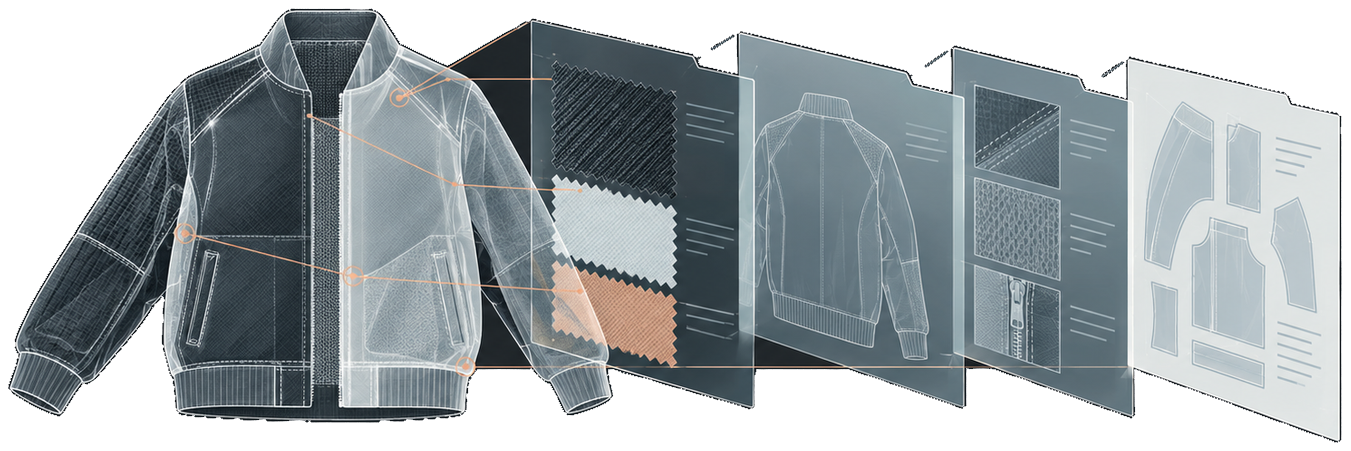
- A tech pack brings together the drawings, materials, measurements and construction details that explain your product to a manufacturer. Clear, consistent information gives you a shared reference for discussing samples and production, rather than leaving important details to interpretation.
- If your needs change, contact the team to discuss the current options for your account. Ask how a proposed change would affect any charges or ongoing projects before you make the change.
- Contact the team for guidance on ending a subscription, if one applies to your account. Ask what happens to ongoing projects, shared information and any outstanding charges before you proceed.
- Bring together your technical drawings, materials and trims, measurements, construction notes, and packaging and labeling instructions. Use the pack as a shared checklist with your manufacturer, and identify any details that still need to be agreed before sampling or production.
- In a small brand, the designer may prepare the tech pack; larger teams may share the work with a product developer. Agree who is responsible for drawings, measurements and updates so everyone knows where to take questions and corrections.
- iCreate describes its Smart Tech Packs as both human-readable and machine-readable, bringing product information into a form that people and systems can use. If your workflow depends on another platform, ask the team about the connection and requirements for your particular setup.
Design & Technical Drawing
- Start with clear flat sketches and callouts that explain the garment and its construction. A 3D rendering can be an additional reference, but discuss what your manufacturer needs rather than using it in place of the technical details.
- Black-and-white technical sketches can make construction details easier to read. Show color choices separately and label them clearly so the drawing communicates construction and the color information remains unambiguous.
- Show the seams, stitching, finishes and other details that affect how the garment is made. Add close-up callouts where a small feature would be hard to understand in the main drawing, and review any unclear construction with your manufacturer.
- Include front and back views so the garment can be understood from both sides. Add inside views or close-ups when they explain details that are not visible in those main views, keeping the labels consistent across the drawings.
Materials & Trims
- Describe each fabric or material clearly and identify where it is used in the garment. Add the composition, weight, color reference and supplier information you have, then check with your manufacturer for any details needed to identify the intended material.
- Add fabric composition and weight when you have them, since they help describe the material you intend to use. If either detail is missing, ask your supplier or manufacturer what information they need rather than guessing or treating it as confirmed.
- Use the bill of materials, or BOM, to identify trims such as zippers and buttons alongside the other materials for the product. Describe each trim and where it is used, adding any supplier or color references needed to distinguish the intended item.
- Supplier information helps identify the material or trim you intend to use. Include the details you have and flag anything that still needs to be sourced or confirmed with your manufacturer.
- Use the colorway tools to distinguish the options for your product. Keep each colorway clearly labeled and connect it to the relevant fabrics and trims so your manufacturer can see which materials belong with each version.
Measurements & Specs
- A spec sheet focuses on garment measurements and fit specifications, while a tech pack brings those measurements together with drawings, materials and construction details. Use the spec sheet as part of the wider product information you discuss during development and production, not only as a post-production record.
- Include the sizes you plan to offer, rather than documenting only the sample size. Check that the measurements are clearly associated with each size, and discuss any missing specifications with your manufacturer before those sizes are produced.
- Include agreed tolerances so you and your manufacturer have a shared reference for acceptable measurement variation. Set them for the relevant garment, material and point of measure with your technical team or manufacturer, rather than applying one quarter-inch value to every measurement.
- A Point of Measure diagram helps show where each garment measurement is taken. Match its labels to the measurements in your spec sheet so the people checking a sample or production garment are working from the same reference.
Construction & Manufacturing
- List the testing and preparation requirements that apply to your garment and materials, and agree them with your manufacturer. If pre-cut fabric resting is needed, record the agreed instructions alongside the other requirements rather than assuming the same preparation applies to every fabric.
- Include the packaging and labeling instructions your manufacturer needs alongside the product details. Keep any packing or shipping instructions clear, and discuss missing requirements before production rather than assuming the factory will choose them for you.
Production & Sampling
- Prepare a clear Smart Tech Pack with your product details, materials, measurements and intended sizes to support a discussion about pricing and minimum order quantities. Use iCreate Core to share product information with your selected manufacturer, and ask that manufacturer about the quantities and requirements for your project.
- If something changes after production starts, contact your manufacturer before relying on an updated tech pack. Agree which changes can still be made and make the current instructions clear to everyone involved, rather than assuming an edit will automatically change work already underway.
- Before sharing a design, decide which information the recipient needs and discuss how it should be used. Ask the team about the sharing controls available for your workflow, and agree any confidentiality arrangements separately rather than assuming a shared tech pack protects your intellectual property.
Sustainable & Ethical Production
- Discuss the pattern layout with your pattern maker or manufacturer and record the agreed arrangement with the product information. Make the intended fabric use clear, but treat waste reduction as a goal to assess for that layout rather than a guaranteed result.
- Ask your selected manufacturer whether made-to-order production or digital sampling is suitable for your product and available in their workflow. Availability depends on the factory's capabilities; if you are exploring factory operations more broadly, speak with the team about iCreate Power.
Support & Contact
- For support, email support@icreate.fashion with a brief description of what you need help with. Include the relevant product and the steps that led to the issue, but leave out passwords and other sensitive information.
- Contact the team to ask about onboarding or training for your group. Describe which iCreate product you use, who needs to take part and what you want to cover so you can discuss the available options.
- Email support@icreate.fashion to describe a bug or suggest a feature. For a bug, explain what you expected and what happened, including the steps involved; for a feature, describe the task you are trying to complete and why the change would help.
Still have a question?
Tell us which product you are considering and what you need to know.
Ask the team