
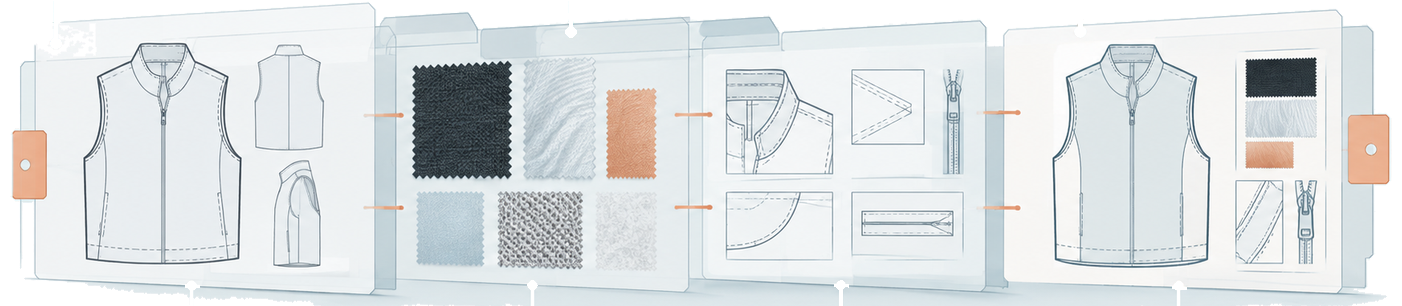

Fashion product information management gives a fashion business a dependable way to organize the details that move a style from an initial brief toward manufacturing. When specifications, measurements, materials, images, and approvals sit in separate spreadsheets and email chains, a small change can create confusion. This guide explains how to assess the problem, build a better workflow, and choose the right level of technology.
Explore iCreate Pro for connected fashion product development
For background on the product documents that carry garment requirements, see our guide to fashion tech packs and product information.
Why do fashion brands outgrow spreadsheets faster than they expect?
Fashion brands usually outgrow spreadsheets when product information must be copied, reconciled, approved, and shared across several people or partners. The issue is not the number of rows in a workbook. It is whether the team can identify the current record, understand its status, and act on the same decision without relying on a private email explanation.
A spreadsheet can be a sensible starting point. It is familiar, quick to edit, and useful for a short product list managed by a small team. The strain appears as collections, colorways, sizes, suppliers, and collaborators multiply. Product data is copied into new files, exported into PDFs, and attached to messages. Each copy may look complete while the team is unsure which one reflects the latest approved decision.
Common warning signs include:
- The same style identifier, measurement, material, or care detail is entered in several places.
- File names such as final, final-v2, and final-new do not show which specification is approved.
- A supplier asks for information the team believes it already sent.
- A product developer searches old messages to understand why a field changed.
- A manager cannot quickly identify who owns a field or approves a revision.
- A handoff depends on one person collecting files and forwarding the latest package.
These signs do not mean every business needs a large enterprise system. They mean the business should compare the cost of maintaining the current process with the effort of establishing a shared source of product information. Map one style from its initial brief through a manufacturing handoff. Mark where each key detail is created, copied, checked, approved, and sent. The map will show whether the root problem is a missing tool, a missing rule, or both.
What is fashion product information management?
Fashion product information management is the organization and control of product data used by a fashion business and its partners. It brings important details into a managed workflow so authorized people can find, understand, update, review, and share the information relevant to their role and the product’s stage.
Depending on the business, that information can include style identifiers, product descriptions, sizes, measurements, colorways, materials, components, images, technical documents, supplier details, and development or production status. The exact field set should follow the decisions the team needs to make. A small label may start with a focused product record, while a larger operation may need more structured product, supplier, and production data.
The phrase describes a discipline as well as a possible software category. A business can practice product information management with controlled documents, a shared repository, or a dedicated platform. Software can make it easier to structure records, manage access, preserve history, and communicate updates. It cannot decide what a status means or who approves a measurement. Those rules still need to be defined by the team.
Product information management is broader than a single tech pack. A tech pack can communicate product specifications, construction information, and supporting visuals. A broader information workflow also addresses where related assets live, how revisions are controlled, who reviews them, and how an approved change reaches the people who need it. For a deeper look at the garment document itself, connect this article with the fashion tech pack guide.
PIM and PLM are also not interchangeable labels in every vendor’s vocabulary. PIM often emphasizes organized product data, while PLM is commonly used for a wider set of product-lifecycle activities. The labels vary, so compare the actual workflow. Ask whether a platform can hold structured product information, support development tasks and approvals, connect collaborators, and show which records remain in another system.
What are the costs of fragmented product data?
Fragmented product data creates work at every handoff because people must search, compare, clarify, and resend information before they can act. The visible result may be a delayed sample or repeated supplier question. The underlying cost is the time spent reconstructing context that should have traveled with the product record.
Scroll horizontally to read the full table.
| Fragmented workflow | What the team has to do | Better information practice |
|---|---|---|
| Measurements live in several files | Compare copies and ask which one is current | Keep a defined source record with units, size range, and revision state |
| Materials are discussed by email | Search threads for the latest choice and approval | Record the selected material, alternatives, owner, and decision status |
| Tech packs are exported repeatedly | Resend PDFs and explain changes manually | Link the product record, supporting assets, and approved handoff |
| Supplier access is informal | Confirm who has seen which file | Use role-based access and a clear sharing process |
Sampling and specification confusion
Sampling requires a manufacturer to interpret product intent. If a measurement, construction note, material choice, or visual reference is missing or outdated, the sample may answer the wrong question. The team then spends another round clarifying the requirement instead of evaluating the intended result. Better records cannot remove every sampling decision, but they can make the decision being tested easier to identify.
Version conflicts and approval gaps
Version conflict occurs when two people act on different copies of the same information. A filename can show that a file changed, but it does not necessarily show who approved the change or what the change affects. A useful workflow separates draft, review, and approved states. It also preserves a short explanation for changes that affect a requirement or handoff.
Delayed supplier and manufacturing handoffs
Handoffs slow down when a person must gather information from several systems before a partner can begin. The delay is not always visible in a project plan because it appears as short searches, follow-up questions, and waiting for confirmation. A connected record gives the recipient a clearer starting point and gives the sender a repeatable definition of ready.
What should a modern fashion PIM system manage across the product lifecycle?
A modern fashion PIM workflow should connect product identity, specifications, assets, decisions, permissions, and status across the stages that matter to the business. It should make the information understandable to the people who create it and useful to the partners who need to act on it.
Product identity and variation
Start with a consistent product identifier and a clear model for variations. Record how a style relates to colorways, sizes, collections, and related products. A team should be able to distinguish a product family from an individual style and an approved variation from a proposal. This structure improves search and reduces the temptation to create a new spreadsheet for every exception.
Specifications, materials, and supporting assets
Keep the details that express product intent connected to the product record. Depending on the workflow, that can include measurements, points of measure, tolerances, construction notes, materials, trims, packaging details, images, and technical documents. A record should show which information is required, which is optional, and which is still awaiting a decision.
iCreate Pro is designed for fashion designers and brands and supports connected product development workflows such as tech packs, product projects, specifications, and collaboration. Its documented capabilities include organized bill of materials information, measurements and specifications, colorway tools, and access to shared product work. Review the iCreate Pro product page for the current product description.
Status, decisions, and history
A status should tell the next person what action is possible. Define the difference between draft, in review, approved, blocked, and ready for a particular handoff. Keep a concise change note for significant revisions. The note can identify the field, the earlier value, the new value, the decision owner, and the people who need to know.
Roles and external collaboration
Map each important field to a role that supplies it, checks it, or approves it. Use role names where possible so the process survives staffing changes. External access should be deliberate. A supplier may need a defined view of approved information without receiving every internal discussion. The team should also know how to correct a record after information has already been shared.
How can connected PIM replace the email-PDF-spreadsheet workflow?
Replacing fragmented product communication works best as a staged process: map the current flow, define the minimum record, assign decision rights, test a real handoff, and expand only after the workflow is clear. A platform is most useful when it supports a process the team understands rather than hiding an undefined process behind new screens.
- Map one product from brief to handoff. Record each place where a product detail is created, copied, reviewed, approved, and shared. Include the questions people ask repeatedly.
- Define a minimum useful record. Separate required product identity, specifications, materials, assets, status, and approval fields from information that can be added later.
- Assign decision rights. Identify who maintains each field, who can propose a change, who approves it, and what happens when the normal owner is unavailable.
- Clean information before migration. Resolve duplicate styles, unclear versions, missing owners, and conflicting values. Do not move every old file into a new system without deciding what it means.
- Run a real handoff test. Give a collaborator a representative record and ask what they would do next. Their questions reveal gaps that an internal review can miss.
- Introduce the workflow in stages. Start with a product family or development phase. Use the first cycle to simplify fields, instructions, and permissions before expanding.
During a transition, spreadsheets can remain useful as temporary working tools. Make the interim process explicit: identify the source record, use stable product identifiers, separate drafts from approvals, and record meaningful changes. Set a review point so the workaround does not become a permanent substitute for a better workflow.
What should you look for in a garment PIM platform?
The best garment PIM platform is the one that lets your team find the right product information, understand its status, and complete ordinary handoffs without private workarounds. Evaluate the workflow with real fashion records, not only a polished demonstration or a list of generic software features.
- Apparel-ready structure: Can the system represent styles, colorways, sizes, measurements, materials, trims, and technical assets in a way your team understands?
- Clear revision control: Can users distinguish drafts, proposed changes, reviews, approvals, and previous versions?
- Useful collaboration: Can designers, brands, suppliers, and manufacturers see the information relevant to their role?
- Practical handoffs: Can a user identify what is ready for a supplier or manufacturing partner without assembling a manual packet?
- Search and taxonomy: Can people find a product by the identifiers and terminology they already use?
- Flexible adoption: Can the team start with a focused workflow and expand without rebuilding every process at once?
- Connected ecosystem: Can the platform fit the other systems used for design, commerce, fulfillment, manufacturing, or inventory?
Ask each vendor to demonstrate a real scenario: a material change after a sample review, a new colorway, a corrected measurement, and a supplier handoff. Ask who can see the change, how approval is recorded, and what the recipient receives. The answers will tell you more than a feature label.
How does iCreate.Fashion fit into a product information workflow?
iCreate.Fashion positions its platform around connected fashion product and manufacturing information, with products for different participants in the garment ecosystem. iCreate Pro serves designers and brands. iCreate Core supports manufacturer-to-designer collaboration and project tracking. iCreate Power supports factory operations across PLM, OS, WMS, ERP, and Rapid Response capabilities.
That product structure matters when you evaluate a PIM workflow. A designer or brand may need a controlled way to organize product intent and collaborate with a manufacturing partner. A manufacturer may need project visibility and clearer handoffs. A factory operator may need product information to connect with broader operational systems. The right path depends on who owns the workflow and where the next decision takes place.
Designers and brands can explore iCreate Pro. Manufacturers can learn about iCreate Core, while factory teams can review iCreate Power. These product paths keep the conversion step aligned with the reader’s role instead of sending every visitor to the same generic message.
Contact iCreate.Fashion to discuss a connected product information workflow
Frequently asked questions
Is fashion product information management the same as PLM?
Not necessarily. PIM often emphasizes organized product data, while PLM commonly describes a broader product-lifecycle workflow. Vendors use the terms differently, so compare the records, approvals, collaboration, and handoffs the platform actually supports.
Can a fashion brand start with spreadsheets?
Yes. A spreadsheet can work when the team is small, changes are limited, ownership is clear, and collaborators can identify the current record. Repeated copying, version uncertainty, and manual handoffs are signs that the process should be evaluated.
What product information should move into a structured record first?
Start with the information needed for the next decision or handoff. That often includes product identity, variation, measurements, materials, key specifications, supporting assets, owner, status, and approval state. Add fields when they support a real task.
How can a team reduce confusion during a platform transition?
Map one real product, define the minimum useful record, clean duplicates and conflicts, test a handoff, and introduce the process in stages. Keep interim spreadsheet rules explicit and set a review point for replacing the workaround.
Should every supplier use the same product information platform?
Not always. The important question is whether the business can provide the right approved information in a controlled, understandable way. Evaluate the access, export, collaboration, and handoff options against the partners and systems in your actual workflow.