
Apparel Manufacturing Systems: A Buyer Guide
Apparel manufacturing systems are the connected tools a fashion team uses to move a style from product data into factory work and then into finished goods. A useful shortlist starts with who owns the work today, not with a vendor name. Brands need a clean product record. Manufacturers need project visibility with their brand partners. Next-generation factories need production, warehouse, and business data in one operating stack.
This guide maps those three jobs to a shortlist and a small pilot. It does not reteach sewing-floor models, score named platforms, or replace an ERP buying review. Use it when spreadsheets, email, and separate tools no longer show the same version of a style.
Talk with iCreate about the system layer you need
What apparel manufacturing systems actually include
People search this phrase for two different answers. One is the sewing-floor model: how operators, bundles, and machines are arranged. The other is the software stack that keeps product, commercial, and factory records aligned. This article covers the second. For the floor models themselves, start with the guide to types of production systems in the garment industry.
The floor still sets the context: sampling and costing lead into spreading, cutting, sewing, finishing, inspection, and shipment. A system is useful when it keeps the approved spec tied to those stages, not when it replaces them.
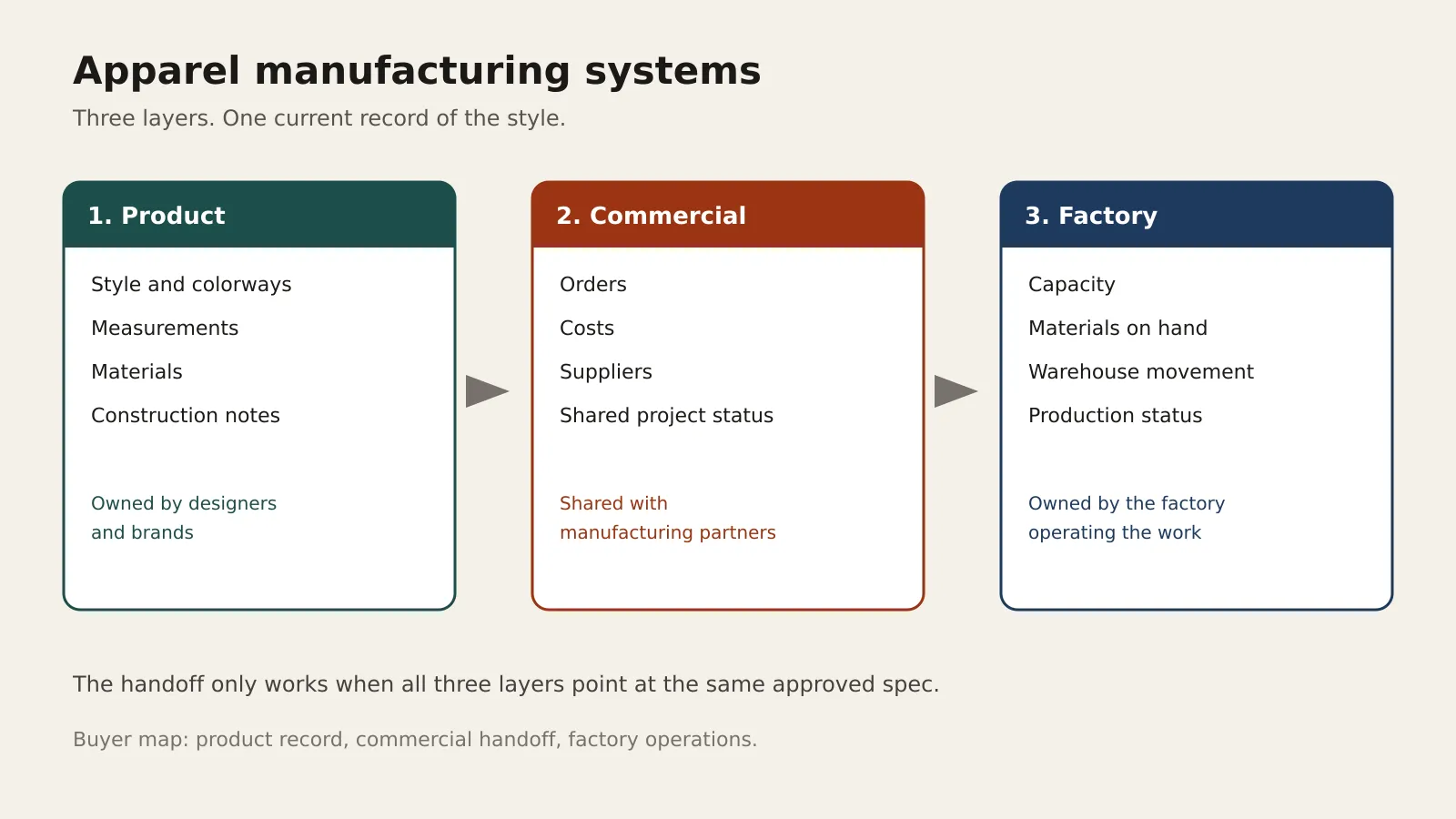
A practical stack has three layers:
This is also a data-connectivity decision. NIST guidance on collecting and reusing manufacturing data recommends defining the use case, identifying available data, planning integrations, and curating context rather than treating connectivity alone as the goal. For an apparel pilot, that means testing whether a style, material, and production status remain understandable when they move between the people and systems that use them.
- Product systems hold the style, colorways, measurements, materials, and construction notes a factory can build from.
- Commercial systems hold orders, costs, suppliers, and the status of work shared with partners.
- Factory systems hold capacity, materials on hand, warehouse movement, and the status of production work.
Those layers only help when they share one current record. A tech pack in one file, a cost sheet in another, and a line plan in a third will drift. The drift shows up as the wrong trim, a late size run, or a shipment that misses the approved sample.
The iCreate platform treats this as one garment ecosystem rather than three unrelated products. Designers and brands use iCreate Pro to organize product information and connect it with partners. Manufacturers use iCreate Core to track projects with Pro users without replacing the factory overnight. Next-generation factories use iCreate Power when they need PLM, an operating layer, warehouse management, ERP, and rapid response in one suite.
Match the system to the team that owns the work
Buy the layer that matches the job you actually run. A design studio does not need a full factory operating system on day one. A multi-line factory does not fix late handoffs by buying another product archive.
Designer or brand.
Main job of the system Keep one current product record and share it with the right partners. Start here Product data, tech packs, access control, and a path to manufacturers. Leave for later Line balancing, warehouse slots, and factory labor planning.
Manufacturer working with brands.
Main job of the system See each project, its specs, and its status without breaking current routines. Start here Project tracking, shared workflow, and a live link to the brand record. Leave for later A full ERP replacement before the handoff is stable.
Next-generation factory.
Main job of the system Run product, materials, warehouse, and production from one operating stack. Start here PLM, factory operations, warehouse, ERP, and a way to respond when demand shifts. Leave for later A product archive that never reaches the floor.
Read the row that matches your team. Then check the next row only if that partner is already in the work. A brand that sends styles to several factories still needs the product layer first. The factory layer matters once those partners must see the same order, material, and status data.
Use the table as a filter, not as a shopping list. If a demo spends its time on line balancing while your real pain is a missing spec, you are in the wrong row. If a demo only shows a prettier tech pack while lines wait on materials, you are in the wrong row the other way.
If your question is which named platform wins a feature grid, use the apparel manufacturing software comparison instead of stretching this map into a scorecard. If the question is how PLM, ERP, warehouse, and factory tools fit as a category, the apparel manufacturing software guide covers that ground.
What has to stay connected before you add another tool
A new system fails when it copies the same style into a second database. Before you add one, name the record that must stay singular.
- The approved product version. Measurements, tolerances, construction, labels, and packaging have to point at one version, not at the last email.
- The bill of materials. Fabric, trims, and supplier notes change by colorway and size. The cost and the cut both depend on that list.
- The handoff. Whoever builds the garment needs the current file, and the brand needs a way to revoke access when a partnership ends.
- The order status. Sampling, production, and shipment should not live in three inboxes.
iCreate Pro is built for the product side of that list. It organizes product information and design assets for designers and brands. Teams use it to store and organize existing designs, then connect that work with suppliers, manufacturers, retailers, and other partners. Access stays under the brand’s control. The public Pro signup is at pro.icreate.fashion.
Core is the manufacturer side of the same handoff. The public Core page describes project tracking with Pro users and a clearer workflow. It is a path from manual routines to a connected system. A factory does not have to stop work in order to start. Power is the factory suite. It brings together PLM, an operating layer, warehouse management, ERP, and rapid response. Product details, materials, and specifications stay in one place.
Do not treat those names as a shopping list. A team that only needs cleaner tech packs should not start with warehouse and ERP scope. A factory that already has reliable product files and is losing time on the floor should not stop at a product archive.
How to shortlist apparel manufacturing systems
Keep the shortlist to two or three options. More than that usually means the job is still undefined.
- Write the job in one sentence. Example: “We need one current tech pack and a shared project status with two factories.” If you must add finance, warehouse, and labor, you need a factory stack. You do not need another product tool.
- Name the system of record. Decide which tool wins when the tech pack, the cost sheet, and the line status disagree. One winner. The others subscribe to it.
- List the people who must see the record. Design, the factory contact, and a buyer are enough for a first pilot. Add warehouse or finance only if they already block the work.
- Check the floor model only as a constraint. A high-volume bundle line and a small-batch team do not need the same status screen. You do not need to re-choose the sewing system to know that.
- Separate brand tools from factory tools. If both sides need software, give each side its own success test. A shared login is not the same as a shared process.
Bring an operator and a product developer into the review, not only a sponsor. The operator will spot a status field no one will update. The developer will spot a spec field the factory cannot build from. For a deeper pass on an existing stack, use the apparel manufacturing software audit rather than turning this shortlist into an audit form.
Teams comparing business systems in general can also read the fashion ERP software buying guide. Keep that read separate. ERP is one layer inside a factory stack. It is not the whole apparel manufacturing system, and it is the wrong first buy for a studio that still lacks a single product record.
Run a pilot that proves the handoff
A pilot should follow one style from an approved spec to a visible factory status. Two weeks on a live style beats a demo on sample data.
- Pick one style that has already caused a version argument. Include at least two colorways or sizes so the bill of materials is not trivial.
- Load the approved spec once. Do not let the team keep a side file “just in case.”
- Share it with the real factory contact. Confirm they can see construction, materials, and measurements without a forwarded PDF.
- Record one status change from the factory side and one change from the brand side. Both should land on the same style.
- Revoke or narrow access at the end of the test if the partnership is limited. Access control is part of the system, not a later setting.
Pass the pilot only if a new teammate can answer three questions from the system alone: which spec is approved, which materials it uses, and where the work stands. If the answer still requires email, the tool is not the system of record yet. Core fits a manufacturer that wants project visibility with designers before a larger factory rollout. Power fits a factory that already needs product, warehouse, and ERP data together. Contact the iCreate team from the contact page for Core or Power. Brands that only need the product layer can open a Pro account directly.
Stop the pilot if the team cannot name a single owner for the spec. Software will not settle a dispute that the process has not settled. Fix the owner, then rerun the same style. Do not add a fourth tool to hide the gap.
Score the pilot on friction, not on a slide. Count how many times someone exported a PDF, retyped a measurement, or asked which file was final. A drop in those moments is a better signal than a long feature list. Write the count down before the pilot and again at the end so the comparison is plain.
Also name what the pilot is not allowed to prove. It does not prove a full season, a second factory, or a warehouse cutover. Those are later decisions. Keeping the test small is what makes a yes or no possible in the same month you start.
Where related work should stay
Several nearby questions look like this one and are better answered on their own pages. Sending the reader there keeps this guide short enough to use.
- Sewing-floor layout, bundles, and team cells belong on the production-systems guide already linked above.
- How planning differs from scheduling belongs on fashion production planning versus scheduling.
- What a complete product file contains belongs on the tech pack fashion guide.
- How a style moves from concept into a factory handoff belongs on the apparel product development process page.
Use those pages when the question changes. Stay here when the question is which system to shortlist, and which layer can wait.
One more boundary is worth stating. Apparel manufacturing systems are not a substitute for a clear commercial agreement with a factory. The software can show the approved spec and the status of the work. It cannot decide price, liability, or who owns a late change. Put those rules in the partnership. Then let the system enforce the version and the access.
That split keeps the buying conversation honest. You are choosing a system of record for product and production facts. You are not buying a guarantee about margin, lead time, or waste. Those outcomes still depend on the floor model, the materials, and the decisions your team makes after the data is visible.
Review iCreate Power for factory operations
Frequently asked questions
What is an apparel manufacturing system?
It is the connected set of product, commercial, and factory tools that move a style from an approved spec into production and finished goods. It is not the same thing as a sewing-floor layout, though the floor layout should constrain which status and material data the software must show.
Do small brands need a full factory system?
No. A designer or brand that is still aligning tech packs and partners should start with a product system and a clear handoff. Factory operating tools matter when you run production, warehouse, and business data yourself, or when your manufacturing partner must share that data with you.
How are these systems different from PLM or ERP?
PLM is the product-development layer. ERP is the business-transaction layer. An apparel manufacturing system is the map of those layers plus the factory and warehouse work they have to support. Buying one layer does not automatically cover the others.
How long should a first pilot last?
Long enough to move one real style from an approved spec to a shared status, and to prove access can be granted and narrowed. If that loop still depends on email, extend the pilot on the same style instead of adding another product.
Choose the system that matches the handoff you run
Start with the team that owns the work. Designers and brands can organize the product record in iCreate Pro and share it under their own access rules. Manufacturers that need project tracking with those brands can talk with iCreate about Core. Factories that need PLM, warehouse, ERP, and day-to-day operations together can review Power. Tell the team which layer you need, and which layer you are deliberately leaving for later.
Contact iCreate to map Core or Power to your current handoff, or create an iCreate Pro account if the product record is the gap you need to close first.